3.10 Doing it in R
We utilize the male mortality data, Skellefteå 1800–1820, to illustrate the aspects of an ordinary Cox regression. Males aged 20 (exact) are sampled between 1820 and 1840 and followed to death or reaching the age of 40, when they are right censored. So in effect male mortality in the ages 20–40 are studied. The survival time starts counting at zero for each individual at his 21st birthdate (that is, at exact age 20 years).
There are two R functions that are handy for a quick look at a data
frame, str and head. The first give a
summary description of the structure of an R object, often a
data frame
'data.frame':   1208 obs. of  6 variables:
 $ id       : int  1 2 3 3 4 5 5 6 7 7 ...
 $ enter    : num  0 3.48 0 13.46 0 ...
 $ exit     : num  20 17.6 13.5 20 20 ...
 $ event    : int  0 1 0 0 0 0 0 0 0 1 ...
 $ birthdate: num  1800 1800 1800 1800 1800 ...
 $ ses      : Factor w/ 2 levels "lower","upper": 2 1 2 1 1 1 2 2 2 1 ...
First, there is information about the data frame: It is a
data.frame, with six variables measured on 1208 objects. Then
each
variable is individually described: name, type, and a few of the first values.
The values are usually rounded to a few digits. The Factor line is
worth noticing: It is of course a factor covariate, it takes two
levels, lower and upper. Internally, the levels are coded 1, 2,
respectively. Then (by default), lower (with internal code equal to
1) is the reference category. If desired, this can be changed with the
relevel function.
'data.frame':   1208 obs. of  7 variables:
 $ id       : int  1 2 3 3 4 5 5 6 7 7 ...
 $ enter    : num  0 3.48 0 13.46 0 ...
 $ exit     : num  20 17.6 13.5 20 20 ...
 $ event    : int  0 1 0 0 0 0 0 0 0 1 ...
 $ birthdate: num  1800 1800 1800 1800 1800 ...
 $ ses      : Factor w/ 2 levels "lower","upper": 2 1 2 1 1 1 2 2 2 1 ...
 $ ses2     : Factor w/ 2 levels "upper","lower": 1 2 1 2 2 2 1 1 1 2 ...
Comparing the information about the variables ses and ses2, you
find that the codings, and also the reference categories, are
reversed. Otherwise the variables are identical, and any analysis involving
any of
them as an explanatory variable would lead to identical conclusions,
but not identical parameter estimates, see below.
The function head prints the first few lines (observations) of a data
frame (there is also a corresponding tail function that prints a few
of the last rows).
  id  enter   exit event birthdate   ses  ses2
1  1  0.000 20.000     0  1800.010 upper upper
2  2  3.478 17.562     1  1800.015 lower lower
3  3  0.000 13.463     0  1800.031 upper upper
4  3 13.463 20.000     0  1800.031 lower lower
5  4  0.000 20.000     0  1800.064 lower lower
6  5  0.000  0.089     0  1800.084 lower lower
Apparently, the variables ses and ses2 are identical, but we know
that behind the scenes they are formally different; different coding and
(therefore) different reference category. This shows up in analyzes
involving the two variables, one at a time.
First the analysis is run with ses.
Call:
coxreg(formula = Surv(enter, exit, event) ~ ses + birthdate,
    data = mort)

Covariate           Mean       Coef     Rel.Risk   S.E.    Wald p
ses
           lower    0.416     0         1 (reference)
           upper    0.584    -0.484     0.616     0.121     0.000
birthdate        1811.640     0.029     1.029     0.011     0.008

Events                    276
Total time at risk         17038
Max. log. likelihood      -1841.7
LR test statistic         23.08
Degrees of freedom        2
Overall p-value           9.72167e-06
Then the variable ses2 is inserted instead.
Call:
coxreg(formula = Surv(enter, exit, event) ~ ses2 + birthdate,
    data = mort)

Covariate           Mean       Coef     Rel.Risk   S.E.    Wald p
ses2
           upper    0.584     0         1 (reference)
           lower    0.416     0.484     1.623     0.121     0.000
birthdate        1811.640     0.029     1.029     0.011     0.008

Events                    276
Total time at risk         17038
Max. log. likelihood      -1841.7
LR test statistic         23.08
Degrees of freedom        2
Overall p-value           9.72167e-06
Notice the difference; it is only formal. The substantial results are completely equivalent.
3.10.1 Likelihood Ratio Test
If we judge the result by the Wald \(p\)-values, it seems as if both
variables are highly significant. To be sure it is advisable to apply the
likelihood ratio test. In R, this is easily achieved by applying the
drop1 function on the result, res, of the Cox regression.
Single term deletions

Model:
Surv(enter, exit, event) ~ ses + birthdate
          Df    AIC     LRT  Pr(>Chi)
<none>       3687.3
ses        1 3701.4 16.1095 5.978e-05
birthdate  1 3692.6  7.2752  0.006991
In fact, we have performed two likelihood ratio tests here. First,
the effect of removing ses from the full model. The \(p\)-value for
this test is very small, \(p = 0.00005998\). The scientific notation,
5.998e-05 means that the decimal point should be moved five steps to the
left (that’s the minus sign). The reason for this notation is essentially
space-saving. Then, the second LR test concerns the absence or presence of
birthdate in the full model. This also gives a small \(p\)-value, \(p = 0.006972\).
The earlier conclusion is not altered; both variables are highly significant.
3.10.2 The estimated baseline cumulative hazard function
The estimated baseline cumulative function (see Equation (3.7)) is best
plotted by the plot command, see Figure 3.10.
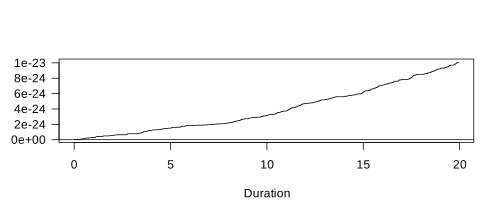
FIGURE 3.10: Estimated cumulative baseline hazard function.
The figure shows the baseline cumulative hazard function for an average individual (i.e., with the value zero on all covariates when all covariates are centered around their weighted means.