6.6 Discrete time models
There are two ways of looking at discrete duration data; either time is truly discrete, for instance the number of trials until an event occurs, or an approximation due to rounding of continuous time data. In a sense all data are discrete, because it is impossible to measure anything on a continuous scale with infinite precision, but from a practical point of view it is reasonable to say that data is discrete when tied events occur embarrassingly often.
When working with register data, time is often measured in years which
makes it necessary and convenient to work with discrete models. A typical
data format is the so-called wide format, where there is one record
(row) per individual, and measurements for many years. We have so far only
worked with the long format. The data sets created by survSplit
are in long format; there is one record per individual and age category.
The R work horse in switching back and forth between the long and wide
formats is the function reshape. It may look confusing at first, but
if data follow some simple rules, it is quite easy to use reshape.
The function reshape is typically used with longitudinal data,
where there are several measurements at different time points for each
individual. If the data for one individual is registered within one record
(row), we say that data are in wide format, and if there is one record (row)
per time (several records per individual), data are in long format. Using
wide format, the rule is that time-varying variable names must end in a
numeric value indicating at which time the measurement was taken. For
instance, if the variable civ (civil status) is noted at times 1, 2,
and 3, there must be variables named civ.1, civ.2, civ.3,
respectively. It is optional to use any separator between the base
name (civ) and the time, but it should be one character or empty. The
“.” is what reshape expects by default, so using that form
simplifies coding somewhat.
We start by creating an example data set as an illustration. This is
accomplished by starting off with the data set oldmort in eha
and “trimming” it.
data(oldmort)
om <- oldmort[oldmort$enter == 60, ]
om <- age.window(om, c(60, 70))
om$m.id <- om$f.id <- om$imr.birth <- om$birthplace <- NULL
om$birthdate <- om$ses.50 <- NULL
om1 <- survSplit(om, cut = 61:69, start = "enter", end = "exit",
                 event = "event", episode = "agegrp")
om1$agegrp <- factor(om1$agegrp, labels = 60:69)
om1 <- om1[order(om1$id, om1$enter), ]
head(om1)
## id sex civ region enter exit event agegrp
## 1 800000625 male widow rural 60 61.000 0 60
## 2 800000625 male widow rural 61 62.000 0 61
## 3 800000625 male widow rural 62 63.000 0 62
## 4 800000625 male widow rural 63 63.413 0 63
## 5 800000631 female widow industry 60 61.000 0 60
## 6 800000631 female widow industry 61 62.000 0 61We may change the row numbers and recode the id so they are easier to read.
##   id    sex   civ   region enter   exit event agegrp
## 1  1   male widow    rural    60 61.000     0     60
## 2  1   male widow    rural    61 62.000     0     61
## 3  1   male widow    rural    62 63.000     0     62
## 4  1   male widow    rural    63 63.413     0     63
## 5  2 female widow industry    60 61.000     0     60
## 6  2 female widow industry    61 62.000     0     61
This is the long format, each individual has as many records as “presence
ages”. For instance, person No. 1 has four records, for the ages 60–63.
The maximum possible No. of records for one individual is 10. We can check
the distribution of No. of records per person by using the function
tapply:
## recs
##   1   2   3   4   5   6   7   8   9  10
## 400 397 351 315 307 250 192 208 146 657
It is easier to get to grips with the distribution with a graph, in this case a barplot,see Figure~.
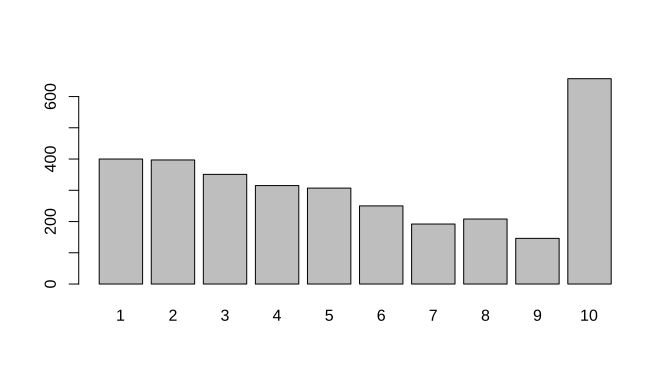
FIGURE 6.17: Barplot of the number of records per person.
Now, let us turn om1 into a data frame in wide format. This is
done with the function reshape. First we remove the redundant
variables enter and exit.
om1$exit <- om1$enter <- NULL
om2 <- reshape(om1, v.names = c("event", "civ", "region"),
               idvar = "id", direction = "wide",
               timevar = "agegrp")
names(om2)
## [1] "id" "sex" "event.60" "civ.60" "region.60" "event.61"
## [7] "civ.61" "region.61" "event.62" "civ.62" "region.62" "event.63"
## [13] "civ.63" "region.63" "event.64" "civ.64" "region.64" "event.65"
## [19] "civ.65" "region.65" "event.66" "civ.66" "region.66" "event.67"
## [25] "civ.67" "region.67" "event.68" "civ.68" "region.68" "event.69"
## [31] "civ.69" "region.69"Here there are two time-fixed variables, id and sex, and three
time-varying variables, event, civ, and region. The
time-varying variables have suffix of the type .xx, where xx varies
from 60 to 69.
This is how data in wide format usually show up; the suffix may start with
something else than ., but it must be a single character, or nothing.
The real problem is how to switch from wide format to long, because our
survival analysis tools want it that way. The solution is to use
reshape again, but other specifications.
##      id    sex time event     civ   region
## 1.60  1   male   60     0   widow    rural
## 2.60  2 female   60     0   widow industry
## 3.60  3   male   60     0 married     town
## 4.60  4   male   60     0 married     town
## 5.60  5 female   60     0 married     town
## 6.60  6 female   60     0 married     town
There is a new variable time created, which goes from 60 to 69, one
step for each of the ages. We would
like to have the file sorted primarily by id and secondary by time.
##      id    sex time event   civ   region
## 1.60  1   male   60     0 widow    rural
## 1.61  1   male   61     0 widow    rural
## 1.62  1   male   62     0 widow    rural
## 1.63  1   male   63     0 widow    rural
## 1.64  1   male   64    NA  <NA>     <NA>
## 1.65  1   male   65    NA  <NA>     <NA>
## 1.66  1   male   66    NA  <NA>     <NA>
## 1.67  1   male   67    NA  <NA>     <NA>
## 1.68  1   male   68    NA  <NA>     <NA>
## 1.69  1   male   69    NA  <NA>     <NA>
## 2.60  2 female   60     0 widow industry
Note that all individuals got 10 records here, even those who only are observed for fewer years. Individual No. 1 is only observed for the ages 60–63, and the next six records are redundant; they will not be used in an analysis if kept, so it is from a practical point of view a good idea to remove them.
## [1] 32230## [1] 17434The data frame shrunk to almost half of what it was originally. First, let us summarize data.
##        id           sex             time           event
##  Min.   :   1   male  : 7045   Min.   :60.00   Min.   :0.00000
##  1st Qu.: 655   female:10389   1st Qu.:61.00   1st Qu.:0.00000
##  Median :1267                  Median :63.00   Median :0.00000
##  Mean   :1328                  Mean   :63.15   Mean   :0.02587
##  3rd Qu.:1948                  3rd Qu.:65.00   3rd Qu.:0.00000
##  Max.   :3223                  Max.   :69.00   Max.   :1.00000
##         civ             region
##  unmarried: 1565   town    :2485
##  married  :11380   industry:5344
##  widow    : 4489   rural   :9605
##
##
##
The key variables in the discrete time analysis are event and
time. For the baseline hazard we need one parameter per value of
time, so it is practical to transform the continuous variable time
to a factor.
##        id           sex             time          event
##  Min.   :   1   male  : 7045   60     :3223   Min.   :0.00000
##  1st Qu.: 655   female:10389   61     :2823   1st Qu.:0.00000
##  Median :1267                  62     :2426   Median :0.00000
##  Mean   :1328                  63     :2075   Mean   :0.02587
##  3rd Qu.:1948                  64     :1760   3rd Qu.:0.00000
##  Max.   :3223                  65     :1453   Max.   :1.00000
##                                (Other):3674
##         civ             region
##  unmarried: 1565   town    :2485
##  married  :11380   industry:5344
##  widow    : 4489   rural   :9605
##
##
##
##
The summary now produces a frequency table for time.
For a given time point and a given individual, the response is whether an
event has occurred or not, that is, it is modeled as a
outcome, which is a special
case of the distribution.
The discrete time analysis may now be performed in several ways. Most
straightforward is to run a
logistic regression with event as
response through the basic glm function with
family = binomial(link=cloglog). The so-called
link is
used in order to preserve the proportional hazards property.
fit.glm <- glm(event ~ sex + civ + region + time,
               family = binomial(link = cloglog), data = om3)
summary(fit.glm)
##
## Call:
## glm(formula = event ~ sex + civ + region + time, family = binomial(link = cloglog),
## data = om3)
##
## Deviance Residuals:
## Min 1Q Median 3Q Max
## -0.4263 -0.2435 -0.2181 -0.1938 2.9503
##
## Coefficients:
## Estimate Std. Error z value Pr(>|z|)
## (Intercept) -3.42133 0.21167 -16.164 < 2e-16 ***
## sexfemale -0.36332 0.09927 -3.660 0.000252 ***
## civmarried -0.33683 0.15601 -2.159 0.030847 *
## civwidow -0.19008 0.16810 -1.131 0.258175
## regionindustry 0.10784 0.14443 0.747 0.455264
## regionrural -0.22423 0.14034 -1.598 0.110080
## time61 0.04895 0.18505 0.265 0.791366
## time62 0.46005 0.17400 2.644 0.008195 **
## time63 0.05586 0.20200 0.277 0.782134
## time64 0.46323 0.18883 2.453 0.014162 *
## time65 0.31749 0.20850 1.523 0.127816
## time66 0.45582 0.21225 2.148 0.031751 *
## time67 0.91511 0.19551 4.681 2.86e-06 ***
## time68 0.68549 0.22575 3.036 0.002394 **
## time69 0.60539 0.24904 2.431 0.015064 *
## ---
## Signif. codes: 0 '***' 0.001 '**' 0.01 '*' 0.05 '.' 0.1 ' ' 1
##
## (Dispersion parameter for binomial family taken to be 1)
##
## Null deviance: 4186.8 on 17433 degrees of freedom
## Residual deviance: 4125.2 on 17419 degrees of freedom
## AIC: 4155.2
##
## Number of Fisher Scoring iterations: 7This output is not so pleasant, but we can anyway see that females (as
usual) have lower mortality than males, that married are better off than
unmarried, and that regional differences maybe are not so large. To get a
better understanding of the statistical significance of the findings we run
drop1 on the fit.
## Single term deletions
##
## Model:
## event ~ sex + civ + region + time
##        Df Deviance    AIC    LRT  Pr(>Chi)
## <none>      4125.2 4155.2
## sex     1   4138.5 4166.5 13.302 0.0002651 ***
## civ     2   4130.2 4156.2  4.978 0.0829956 .
## region  2   4135.8 4161.8 10.526 0.0051810 **
## time    9   4161.2 4173.2 36.005 3.956e-05 ***
## ---
## Signif. codes:  0 '***' 0.001 '**' 0.01 '*' 0.05 '.' 0.1 ' ' 1
Mildly surprisingly, civil status is not that statistically
significant, but region (and the other variables) is. The strong
significance of the time variable is of course expected; mortality is
expected to increase with increasing age.
An equivalent way, with a nicer printed output, is to use the function
in the package glmmML.
fit.boot <- glmmML::glmmboot(event ~ sex + civ + region, cluster = time,
                     family = binomial(link = cloglog),
                     data = om3)
fit.boot
##
## Call: glmmML::glmmboot(formula = event ~ sex + civ + region, family = binomial(link = cloglog), data = om3, cluster = time)
##
##
## coef se(coef) z Pr(>|z|)
## sexfemale -0.3633 0.09929 -3.6593 0.000253
## civmarried -0.3368 0.15605 -2.1585 0.030900
## civwidow -0.1901 0.16813 -1.1305 0.258000
## regionindustry 0.1078 0.14448 0.7464 0.455000
## regionrural -0.2242 0.14037 -1.5974 0.110000
##
## Residual deviance: 4273 on 17419 degrees of freedom AIC: 4303The parameter estimates corresponding to time are contained in the
variable \(fit\$frail\). They need to be transformed to get the “baseline
hazards”.
##  [1] 0.03163547 0.03317001 0.04920603 0.03339226 0.04935523 0.04294934
##  [7] 0.04900860 0.07542353 0.06089140 0.05646886
A plot of the hazard function is shown in Figure 6.18.
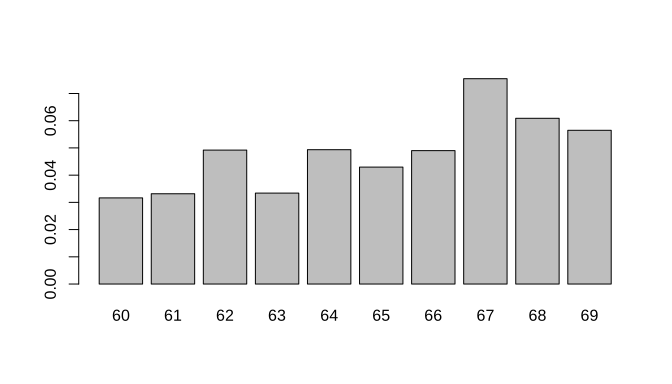
FIGURE 6.18: Baseline hazards, old age mortality.
By some data manipulation we can also use eha for the analysis. For
that to succeed we need intervals as responses, and the way of doing that
is to add two variables, exit and enter. The latter must be
slightly smaller than the former:
om3$exit <- as.numeric(as.character(om3$time))
om3$enter <- om3$exit - 0.5
fit.ML <- coxreg(Surv(enter, exit, event) ~ sex + civ + region,
                 method = "ml", data = om3)
fit.ML
## Call:
## coxreg(formula = Surv(enter, exit, event) ~ sex + civ + region,
## data = om3, method = "ml")
##
## Covariate Mean Coef Rel.Risk S.E. Wald p
## sex
## male 0.404 0 1 (reference)
## female 0.596 -0.363 0.695 0.099 0.000
## civ
## unmarried 0.090 0 1 (reference)
## married 0.653 -0.337 0.714 0.156 0.031
## widow 0.257 -0.190 0.827 0.168 0.258
## region
## town 0.143 0 1 (reference)
## industry 0.307 0.108 1.114 0.144 0.455
## rural 0.551 -0.224 0.799 0.140 0.110
##
## Events 451
## Total time at risk 8717
## Max. log. likelihood -2062.6
## LR test statistic 27.23
## Degrees of freedom 5
## Overall p-value 5.14285e-05Plots of the cumulative hazards and the survival function are easily achieved, see Figures @ref{fig:cumML6} and 6.20.
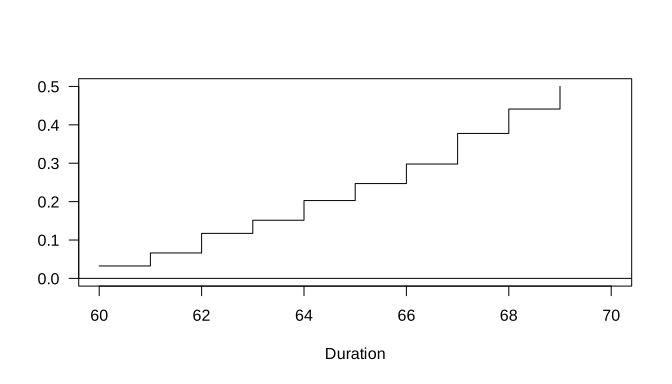
FIGURE 6.19: The cumulative hazards, from the coxreg fit.
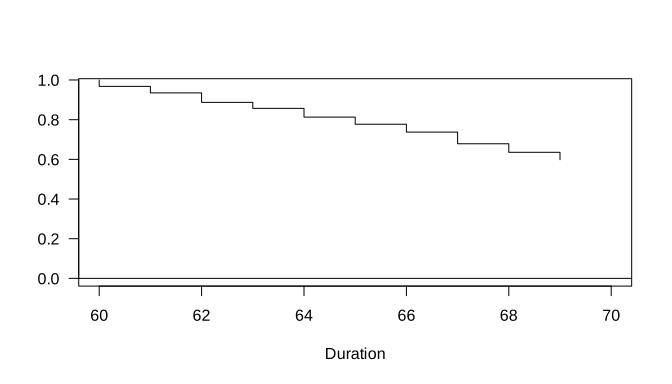
FIGURE 6.20: The survival function, from the coxreg fit.
Finally, the proportional hazards assumption can be tested in the discrete
time framework by creating an interaction between time and the
covariates in question. It is only possible by using glm.
fit2.glm <- glm(event ~ (sex + civ + region) * time,
                family = binomial(link = cloglog),
                data = om3)
drop1(fit2.glm, test = "Chisq")
## Single term deletions
##
## Model:
## event ~ (sex + civ + region) * time
## Df Deviance AIC LRT Pr(>Chi)
## <none> 4077.1 4197.1
## sex:time 9 4088.2 4190.2 11.116 0.2679
## civ:time 18 4099.5 4183.5 22.425 0.2137
## region:time 18 4093.7 4177.7 16.600 0.5508There is no sign of non-proportionality.